မဂၤလာပါေမာင္ခိုင္ထူးဘေလာ့ကိုလာလည္ေသာမိတ္ေဆြအေပါင္းေပ်ာ္႐ႊင္ခ်မ္းေႁမ႔ၾကပါေစ

This is default featured post 1 title

Go to Blogger edit html and find these sentences.Now replace these sentences with your own descriptions.This theme is Bloggerized by Lasantha Bandara - Premiumbloggertemplates.com.

This is default featured post 2 title

Go to Blogger edit html and find these sentences.Now replace these sentences with your own descriptions.This theme is Bloggerized by Lasantha Bandara - Premiumbloggertemplates.com.

This is default featured post 3 title

Go to Blogger edit html and find these sentences.Now replace these sentences with your own descriptions.This theme is Bloggerized by Lasantha Bandara - Premiumbloggertemplates.com.

This is default featured post 4 title

Go to Blogger edit html and find these sentences.Now replace these sentences with your own descriptions.This theme is Bloggerized by Lasantha Bandara - Premiumbloggertemplates.com.

This is default featured post 5 title

Go to Blogger edit html and find these sentences.Now replace these sentences with your own descriptions.This theme is Bloggerized by Lasantha Bandara - Premiumbloggertemplates.com.

วันเสาร์ที่ 11 มกราคม พ.ศ. 2557

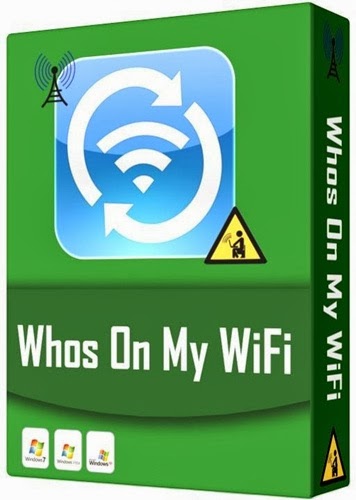
Who On My Wifi 2.1.3


Who On My Wifi ကို အားလံုးသိၾကမွာပါ...။

WiFi ပိုင္ရွင္ေတြ မိမိတို႔ရဲ႕ Internet Connection ကို ဘယ္ႏွစ္ေယာက္ေတာင္ ခိုးသံုေန သလဲ ဆိုတာကို 
ရွာေပးမဲ့ Software ေလးပါ။ ေနာက္ဆံုး Update ေလးျဖစ္တာက တစ္ေၾကာင္း Install လုပ္စရာမလိုတဲ့ 
Portable Version ေလးျဖစ္တာက တစ္ေၾကာင္းမို႔ ထပ္တင္ေပးလိုက္ပါတယ္...။

As the owner of a wireless network, you want to protect it from hackers and freeloaders. 
Download Who's On My Wifi and find them today.

Are People On Your Network Right Now?

If you’ve stumbled across this site, chances are that you’re concerned about how secure 
your wireless network really is. 

You might even be concerned that someone you don’t know is connected to your network 
this very minute.

The problem is you can’t see a wireless network. You can’t touch it. And you can’t know 
who is connected to it without some help.

But there is a way to be 100% certain that no one is on your Wireless Network but the 
computers and devices that you want to be on it…

Supported OS: Windows All 
Home Page: http://www.whoisonmywifi.com/

Download Portable Version
Download Setup

How it Work !


Read more: ဆိုင္မြန္စာၾကည့္ဆိုဒ္: Who On My Wifi 2.1.3 http://www.simon-vlog.com/2014/01/who-on-my-wifi-213.html#ixzz2q1AWOcUc 
Under Creative Commons License: Attribution 
Follow us: @SimonRau on Twitter | OnlineReading on Facebook

ANDROID ေတြကုိ PATTERN LOCK , PASSWARD ေမ့သြားရုံမကပဲ GOOGLE ACCOUNT ေတာင္းတာကိုေေတာင္မွ ျဖည္ႏိူင္တဲ့ SHUAME.....


Android ေတြကုိ pattern lock , passward ေမ့သြားရုံမကပဲ google account 

ေတာင္းေနတဲ့ အေျခအေနမွာေတာင္ ဒီေကာင္ေလးကျဖည္ႏုိင္ပါတယ္။

ဒီ software ေလးကလူေတြေတာ္ေတာ္မ်ားမ်ားသိျပီးသားပါပဲ။

တရုတ္ software ေလးပါပဲ ... အခု update ထက္ထြက္လာျပန္ပါျပီ။

အရင္ကထက္ပုိျပီးေကာင္းလာသလုိ ပုိျပီးလည္းအဆင္ေျပသြားပါတယ္။

lock ျဖည္ဖုိ႕ေတာ့ awmif USB Debugging on ထားဖုိ႕နဲ႕ Root လုပ္ထားဖုိ႕ေတာ့လုိအပ္ပါတယ္။

Root မလုပ္ရေသးရင္ေတာင္ အနည္းဆုံး USB Debugging on ေပးထားရင္ေတာ့

အဆင္ေျပပါတယ္။

USB Debugging on ထားရင္ဖုန္းထဲကုိ၀င္ၾကည့္လုိ႕ရပါတယ္။

Root လုပ္လုိ႕လဲရပါတယ္ ... ဒီေလာက္ေကာင္းတဲ့ software ေလးကုိ မသိေသးသူေတြအတြက္

ျပန္လည္မွ်ေ၀ေပးလုိက္ပါတယ္။

သိျပီးသားသူေတြကေတာ့ update version လုိအပ္မယ္ဆုိရင္ေတာ့ယူလုိက္ပါ။
Shuame software ေလးကုိေတာ့ .......

         >>>>>>> ဒီေအာက္ကေနယူလုိက္ပါ <<<<<<<

MILOSHARE

TUSFILES


.........::::: အဆင္ေျပပါေစ :::::..........


သင့္Blogက ပိုစ့္ေတြကို Facebook တြင္ Automatic ေရာက္ေအာင္လုပ္နည္း (Blogger only)

မဂၤလာပါ။ Tech in Blogging မွႀကိဳဆိုပါတယ္။ မေျပာျပခ်င္ေတာ့လည္းေျပာရေတာ့မယ့္အေနထားပါ။ ကြ်န္ေတာ္ကေတာ့ လူၿပိန္းနားလည္ေအာင္ႀကိဳးစားၿပီးရွင္းျပမယ္ဗ်ာ။ နားမလည္ရင္ စာေရးသူည့ံတာထက္ သင္တို႕ေသခ်ာမဖတ္ၾကလို႕ပါ။ မသိေသးသူမ်ားအတြက္ပါ။ winkabarkyaw.net ကေရးတာမရွင္းလို႕ဆိုလို႕ပါ။ ကြ်န္ေတာ္လည္း လူၿပိန္းပါပဲ။ ကြ်န္ေတာ္ networkedblogs ကိုမႏွစ္ကတည္းကသံုးေနတာပါ။ အလြန္အဆင္ေျပပါတယ္။


http://adf.ly/NUprJ ကို၀င္လိုက္ပါ။ မရရင္ {ဒီမွာကလစ္} ပါ။


ၿပီးတာနဲ႕ ကြ်န္ေတာ္၀ိုင္းထားတဲ့အတိုင္း Get Started Now ကို၀င္ပါဗ်ာ။
Facebook အေကာင့္ဖြင့္ထားရင္ေတာ့ ေနာက္တစ္ဆင့္သြားပါ။ မဖြင့္ရေသးရင္ ၀င္လုိက္ပါဗ်ာ။
Log in with Facebook ကိုကလစ္လိုက္ပါ။
Click here to continue  ကိုကလစ္လုိက္ပါ။
Register a Blog ကိုကလစ္ပါ။
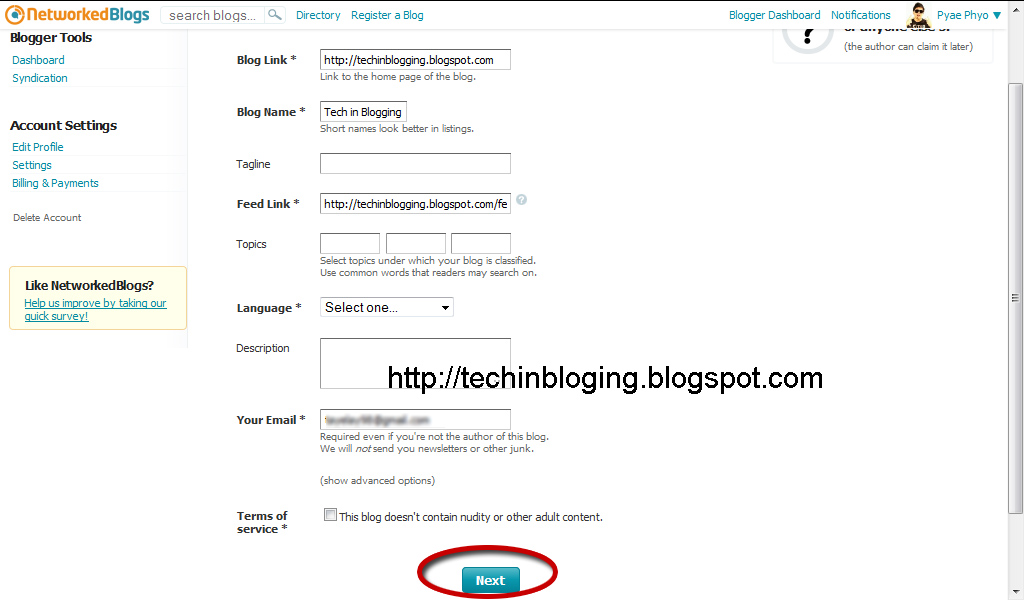
ကြ်န္ေတာ္အနီေရာင္နဲ႕၀ိုင္းထားတဲ့ေနရာမွာ သင့္ရဲ႕ Blogger link ကိုထည့္ပါ။( ဥပမာ - http://techinblogging.blogspot.com ) ၿပီးရင္ Next ကိုကလစ္ပါ။
အကုန္ျဖည့္ပါ။ Terms of service* ရဲ႕ညာဘက္က box ကိုအမွန္ျခစ္ေပးခဲ့ပါ။ Language* မွာ English လို႕ေပးပါ။ ၿပီးတာနဲ႕ Nextကိုကလစ္ပါ။
Yes ကိုကလစ္လိုက္ပါ။
ေမးလ္၀င္လာတာနဲ႕ အိုေခပါၿပီ။ ကဲ။ ဆက္ဖတ္ရေအာင္။
Blogger Dashboard ကိုကလစ္လုိက္ပါ။
Syndication ကိုကလစ္လိုက္ပါ။

Grant Permissons ကိုကလစ္ပါ။
New window အေနနဲ႕ ေပၚလာလိမ့္မယ္။ Allow ကိုကလစ္ပါဗ်ာ။
(1) Choose a blog to syndicate ရဲ႕ေအာက္မွာ သင့္ရဲ႕ Blog နာမည္ကိုရွာၿပီးထည့္လုိက္ပါ။ ကြ်န္ေတာ့္ ဘေလာ့နာမည္က Tech in Blogging ပါ ဒါေၾကာင့္ အဲ့ဒါပဲေရြးလိုက္ပါတယ္။

Add Facebook Target ကိုကလစ္ပါဗ်ာ။
ကြ်န္ေတာ္ကေတာ့ Pyae Phyo ဆိုတဲ့ page မွာပဲ Add လိုက္ပါတယ္ဗ်ာ။ ၿပီးရင္ Already added ျပၿပီးရင္ ေအာင္ျမင္ၿပီးဆံုးသြားပါၿပီ။ ကြ်န္ေတာ့္လိုနလပိန္းတံုးမ်ား နားလည္ေစေအာင္လို႕တင္ေပးတာပါ။

Font Browser - BETA ( Android APP )


-----------------------------------------
ျမန္မာစာ မေပၚေသးတဲ့ဖုန္းေတြမွာ ျမန္မာ font ေတြ မထည့္ခင္ ဖုန္းမွာ ဘယ္ font နဲ႔ အဆင္ေျပ မေျပကို system ထဲထိသြင္းစရာမလို (restart) ဆင္းစရာမလိုပဲ
ယခု ေဆာ့ဖ္၀ဲထဲမွာ အရင္ဆံုး preview အေနနဲ႔ေရာ ေနာက္ font ကို စိတ္တိုင္းက် font size ေျပာင္းၿပီးေတာ့ လည္း စမ္းသပ္ႏိုင္ေအာင္ ျပဳလုပ္ေပးထားပါတယ္။

အသံုးျပဳနည္းမွာ -- ဖုန္းတြင္ ျမန္မာ font သြင္းမထားရ၊ မိမိ စမ္းသပ္ခ်င္ေသာ font ဖိုင္ .ttf ကို /sdcard/nso ဆိုတဲ့ folder ထဲမွာ ထည့္ထားေပးရံုပါ။

Font tester ဆိုတဲ့ function ေလးက Font developer ေတြအတြက္လည္း အဆင္ေျပမယ္လို႔ ေမွ်ာ္လင့္ပါတယ္ဗ်ာ။

BETA ဗားရွင္းသာ ျဖစ္သည့္အတြက္ bug ႏွင့္ အၾကံျပဳခ်င္သူမ်ားအတြက္ https://facebook.com/mgkboy (0r) heroxp91191@gmail.com သို႔ ေက်းဇူးျပဳၿပီး ပို႔ေပးေစလိုပါတယ္။

ေနာက္ဗားရွင္းမ်ားတြင္ ယခုထက္ function ပိုစံုႏိုင္ေအာင္ ဆက္လက္ႀကိဳးစားသြားပါမည္။

Download :


Please Share Original Download Link Only, thz 

---------------------------------
MGKBoy@JOY Mobile Service

Credit:https://www.facebook.com/mgkboy

วันศุกร์ที่ 10 มกราคม พ.ศ. 2557

ပုံေတြ စာလုံးေတြ အရိပ္ေပၚေအာင္လုပ္ၾကမယ္

  မိမိတို႕ ပုံေတြ စာသားေတြကို အရိပ္ေလးေတြနဲ႕ ဖန္တီးလိုပါက  အလြယ္တကူဖန္တီးနိဳင္ေအာင္
မွ်ေ၀လိုက္ပါတယ္.. အမူနာ ပုံေလးကေတာ့  ဘေလာ့ခရီးသည္တို႕ ဇနီးေမာင္ႏွံပုံေလးပါ.....တိန္.....
ဘုမွ ေျခာက္အေပါနဲ႕ေနာ္...ာတးတားခ်က္တတ္လို႕...ေိေိ
ကဲစိတ္၀င္စားရယ္          သည္ေနရာ     ေလးကေတ သြားလိုက္ပါေနာ္..


အဲလိုေလးက်လာမယ္... Image file name ကေန  Bowser ကိုကလစ္လုိက္ပါ..ဒါဆို ကြန္ပ်ဴတာ ဖိုင္
က်လာပါမယ္.. မိမိတို႕ လုပ္လိုေသာ ပုံေတြ ကိ္ုေရြးခ်ယ္ ဖန္တီးနိဳင္ပါျပီ.... အလြယ္ေလးးေနာ္...
တားတား ေကာင္မေယးးေတာ့ အယူၾကနဲ႕တိနားးးး ေိေိေိေိ

Zawgyi Font & Keyboard ထည့္သြင္းနည္း For iOS7 {works on both Notes and Mobile Safari}


ၿမန္မာေဖာင္.ႏွင္. ကီးဘုတ္သြင္း လို.ရတာၾကာပါၿပီး ခင္ဗ်။သို.ေသာ္...Note and Mobile Safari တိုတြင္ၿမန္မာစာမေပၚေသးပါ။ Note and Mobile Safari ၿမင္ခ်င္ပါက Safari ကေန Zawgyi ေဖာင္.ကိုထပ္သြင္းေပးရတယ္.......အခုေတာ့ ဒီအခက္အခဲးကိုေၿဖရွင္ႏိုင္ခဲ့ပါၿပီ......Cydia ကေန Zawgyi ေဖာင္.တစ္ခုကိုသြင္းလိုက္ရင္ရပါၿပီး။ဒီေဖာင့္ ႏွင္. ကီးဘုတ္သြင္းရန္အတြက္ Jailbreak ၿပဳလုပ္ထားရန္လိုအပ္ပါတယ္.....Jailbreak လုပ္နည္းကိုသိခ်င္ပါက ဒီမွာဝင္ဖတ္ေပးပါ။


Cydia မွာ...ကြ်န္ေတာ္...Repo ကို Add လိုက္ပါ။

Cydia > Manage > Sources > Edit > Add > http://cydia.myrepospace.com/komin27/

Cydia မွာ Repo Add လုပ္နည္းမသိပါက ဒီမွာဖတ္ေပးပါ။


Add လုပ္ၿပီးရင္ ကြ်န္ေတာ္ Repo ထည္းက Zawgyi Font For IOS 7 (2) ကို install လုပ္ေပးပါခင္ဗ်။Zawyi Font ႏွစ္ခု ထည္းက........Zawgyi Font For IOS 7 (2) ကို install


 ကီးဘုတ္ ထည့္နည္းကေတာ.လြယ္ပါတယ္.....ကြန္ေတာ္ Repo ထည္းက ttKeyboard ကိုသြင္းေပးပါခင္ဗ်။


 ဒီေဖာင္.ကို ကို Thant Thet Khin Zaw ကၿပဳလုပ္ေပးထားတာပါ ခင္ဗ်။
ပိုစ့္ေရးသားသူ=== KOMIN(MYANMAR IDROID APP FREE)

MMAS Root & Font Installer v 1.0 for android


MMAS Root & Font Installer v 1.0 for android


ဒီရက္ပုိင္းAndroidOSဖုန္းအသုံးျပဳသူေတြအတြက္ဘာေဆာ့၀ဲေရးရင္ေကာင္းမလဲလုိ႕စဥ္းစားရင္းနဲ႕အခုမွဖုန္းစသုံးမယ့္user ေတြေရာ၊သုံးေနက်users ေတြေရာလုိအပ္မယ့္ေဆာ့၀ဲတစ္ခုကုိေရးသားျဖစ္သြားပါတယ္။ ေဆာ့၀ဲနာမည္ကုိေတာ့
MMAS Root & Font Installer လုိ႕အမည္ေပးထားပါတယ္။ ဒီေဆာ့၀ဲေလးက ဘာေတြလုပ္ေဆာင္ေပးနုိင္မလဲဆုိရင္ ဖုန္းကုိ root လုပ္ျခင္း ၊ ျမန္မာေဖာင့္ထည့္ျခင္း ၊ ျမန္မာကီးဘုတ္ထည့္ျခင္းမ်ားကုိ MMAS Root & Font Installer တစ္ခုထဲနဲ႕တင္ ဖုန္းကုိ root လုပ္နုိင္ ၊ ျမန္မာ Font ထည့္သြင္းနုိင္ ၊ ျမန္မာကီးဘုတ္ထည့္သြင္းနုိင္ျပီျဖစ္ပါတယ္။ ဒီေဆာ့၀ဲေလးကုိ ကြ်န္ေတာ္ အရင္တုန္းကေရးေနက်ေဆာ့၀ဲပုံစံေတြနဲ႕မတူဘဲ ဒီဇဳိင္း layout ပုိင္းကုိသိသိသာသာေျပာင္းလဲေရးသားထားပါတယ္။ အသံုးမ်ားတဲ့ Root Tool ေတြျဖစ္တဲ့ vRoot,Baidu Root ေဆာ့၀ဲမ်ား ၊ users ရဲ႕ဖုန္းေတြကုိ error အနည္းဆုံးနဲ႕ ျမန္မာစာထည့္သြင္းေပးမယ့္ Z.F.C Zawgyi Changer ၊ ျမန္မာကီးဘုတ္အတြက္အေကာင္းဆုံးကီးဘုတ္ျဖစ္တဲ့ Bagan Keyboard Pro တုိ႕ကုိ MMAS Root & Font Installer ေဆာ့၀ဲထဲမွာတစ္ပါတည္းထည့္သြင္းေပးထားပါတယ္။ ဒါေၾကာင့္ ဖုန္းကုိ root လုပ္ခ်င္သူ ၊ ျမန္မာ Font ထည့္ခ်င္သူ ၊ ျမန္မာကီးဘုတ္ထည့္ခ်င္သူေတြအေနနဲ႕ MMAS Root & Font Installer ေဆာ့၀ဲကုိဖုန္းမွာသြင္းထားလုိက္ရင္ အားလုံးျပည့္စုံသြားမွာျဖစ္ပါတယ္။ MMAS Root & Font Installer for Android ကုိ Android 4.0 ႏွင့္အထက္ဖုန္းတုိင္းမွာအသုံးျပဳနုိင္ပါတယ္။MMAS Root & Installer ေဆာ့၀ဲလ္ကုိ ေရးသားသူကေတာ့ ကုိသက္ႏုိင္စုိး(Myanmar Mobile App Store)ျဖစ္ပါတယ္..
MMAS Root & Font Installer for Android ကုိ ေအာက္က link မွာရယူနုိင္ပါတယ္။
ေဆာ့၀ဲလ္အားရယူရန္

credit by >  http://www.myanmarmobileapp.com/

LinkWithin

Related Posts Plugin for WordPress, Blogger...

Share

Twitter Delicious Facebook Digg Stumbleupon Favorites More