မဂၤလာပါေမာင္ခိုင္ထူးဘေလာ့ကိုလာလည္ေသာမိတ္ေဆြအေပါင္းေပ်ာ္႐ႊင္ခ်မ္းေႁမ႔ၾကပါေစ

This is default featured post 1 title

Go to Blogger edit html and find these sentences.Now replace these sentences with your own descriptions.This theme is Bloggerized by Lasantha Bandara - Premiumbloggertemplates.com.

This is default featured post 2 title

Go to Blogger edit html and find these sentences.Now replace these sentences with your own descriptions.This theme is Bloggerized by Lasantha Bandara - Premiumbloggertemplates.com.

This is default featured post 3 title

Go to Blogger edit html and find these sentences.Now replace these sentences with your own descriptions.This theme is Bloggerized by Lasantha Bandara - Premiumbloggertemplates.com.

This is default featured post 4 title

Go to Blogger edit html and find these sentences.Now replace these sentences with your own descriptions.This theme is Bloggerized by Lasantha Bandara - Premiumbloggertemplates.com.

This is default featured post 5 title

Go to Blogger edit html and find these sentences.Now replace these sentences with your own descriptions.This theme is Bloggerized by Lasantha Bandara - Premiumbloggertemplates.com.

แสดงบทความที่มีป้ายกำกับ facebook แสดงบทความทั้งหมด

วันอังคารที่ 2 ธันวาคม พ.ศ. 2557

Facebook v22.0.0.1.13 Apk

Facebook v22 ေလးကိုတင္ေပးလိုက္ပါတယ္။Update အသစ္ေလးေတြေနာက္ထပ္လန္းလန္းေလး
ေတြပါလာပါတယ္။လိုအပ္ရင္ေအာက္မွာဆြဲလိုက္ပါ။26MB ပဲရွိပါတယ္။ဒီေကာင္ေလဘးကေတာ့
ျမန္ဆန္မႈရွိျပီး  feedback ျပႆ     နာေတြလည္းကင္းပါတယ္။group ဖြဲ႔ျပီး Text, chat ေတြလည္း
ျပဳလုပ္ႏိုင္ပါတယ္။ 


What’s New Facebook v22.0.0.1.13 Apk:
• Improvements for reliability and speed
Keeping up with friends is faster than ever.
• See what friends are up to
• Share updates, photos and videos
• Get notified when friends like and comment on your posts
• Text, chat and have group conversations
• Play games and use your favorite apps
Now you can get early access to the next version of Facebook for Android by becoming a beta tester. Learn how to sign up, give feedback and leave the program in our Help Center: http://on.fb.me/133NwuP
Problems downloading or installing the app? See http://bit.ly/GPDownload1
Still need help? Please tell us more about the issue. http://bit.ly/invalidpackage
Facebook is only available for users age 13 and over.
Terms of Service: http://m.facebook.com/terms.php.


★★နည္းပညာၿမိဳ႕ေတာ္★★

วันอาทิตย์ที่ 26 ตุลาคม พ.ศ. 2557

Facebook မွာ mp3 သီခ်င္းတင္နည္း


facebook mp3 upload icon


ပထမဦးစြာ https://posterous.com/register ဒီေနရာေလးကို သြားျပီးရီဂ်စ္စတာလုပ္လိုက္ပါ။

-ၿပီးရင္ youre almost there ကိုကလစ္ပါ။


(ပံု၁)

 
-ရီဂ်စ္စတာျပီးဆံုးပါကေအာက္ကပံုအတိုင္းမိမိ
အေကာင့္ကိုျမင္ရပါ့မယ္အဲ့ဒီမွာမွ်ားျပထားတဲ့အတိုင္း

Post by Email ကိုကလစ္ပါ။
(ပံု၂)


-ၿပီးရင္ေဖ့ဘြတ္ေပၚမွာတင္ျပမွာျဖစ္တဲ့အတြက္ Post by web ကိုကလစ္ပါ။

(ပံု၃)
-ၿပီးရင္ သီခ်င္းတင္မွာျဖစ္တဲ့အတြက္ Media ဆိုတဲ့အေပၚမွ်ားအတိုင္းကလစ္ပါ။


(ပံု၄)
-ထိုအခါဘေလာ့က္စ္တစ္ခုေပၚလာပါလိမ့္မယ္။
မိမိတင္ခ်င္တဲ့သီခ်င္းကိုလိုက္ရွာပါ။


ျပီးရင္openကိုႏွိပ္ပါ။
သီခ်င္းကို upload တင္ပါ့လိမ့္မည္ျပီးဆံုးသည္အထိေစာင့္ေပးပါ။

(ပံု၅)
-သီခ်င္းတင္ျပီးပါက Publish ကိုႏွိပ္ပါ။
သိမ္းထားလိုပါက Save ကိုႏွိပ္ပါ။


(ပံု၆)
-ျပီးရင္မိမိတင္ေသာသီခ်င္းေပၚလာပါလိမ့္မယ္။
Playကိုႏိွပ္ၿပီးအစမ္းနားေထာင္ၾကည့္ႏိုင္ပါတယ္။


 ပံု(၇)
 
-ၿပီးရင္သီခ်င္းေအာက္ကေဖ့ဘြတ္အိုင္ကြန္ Like ကိုႏွိပ္ပါ။ထိုသို႔မႏွိပ္ခင္မိမိေဖ့ဘြတ္အေကာင့္ကို
ဖြင့္ထားရမွာျဖစ္ပါတယ္။loadingလုပ္ေနပါမယ္။


ျပီးဆံုးပါကမိမိေဖ့ဘြတ္အေကာင့္န္ကိုReload
လုပ္လိုက္ပါ။တင္လိုက္တဲ့သီခ်င္းဟာမိမိရဲ႕profile မွာေရာက္ရွိေနပါလိမ့္မယ္။
Google Chrome ျဖင့္အဆင္ေျပသည္။
ေဆာ႔၀ဲေတြ update လုပ္ခိုင္းလွ်င္မလုပ္ပါနွင္႔။

(ပံု၈)
 
 
Credit : ကို ေဇာ္ သြင္

วันเสาร์ที่ 11 ตุลาคม พ.ศ. 2557

Facebook မွာ မိမိ သံုးတဲ့ password ကို ၾကည့္မယ္


ကဲကဲ..Facebook မွာကိုယ္သံုးတဲ့ password ကို ျပန္မၾကည့္ခ်င္ၾကဘူးလား

Firefox မွာေတာ့ၾကည့္လို႔ရပါတယ္ ခင္ဗ်ာ

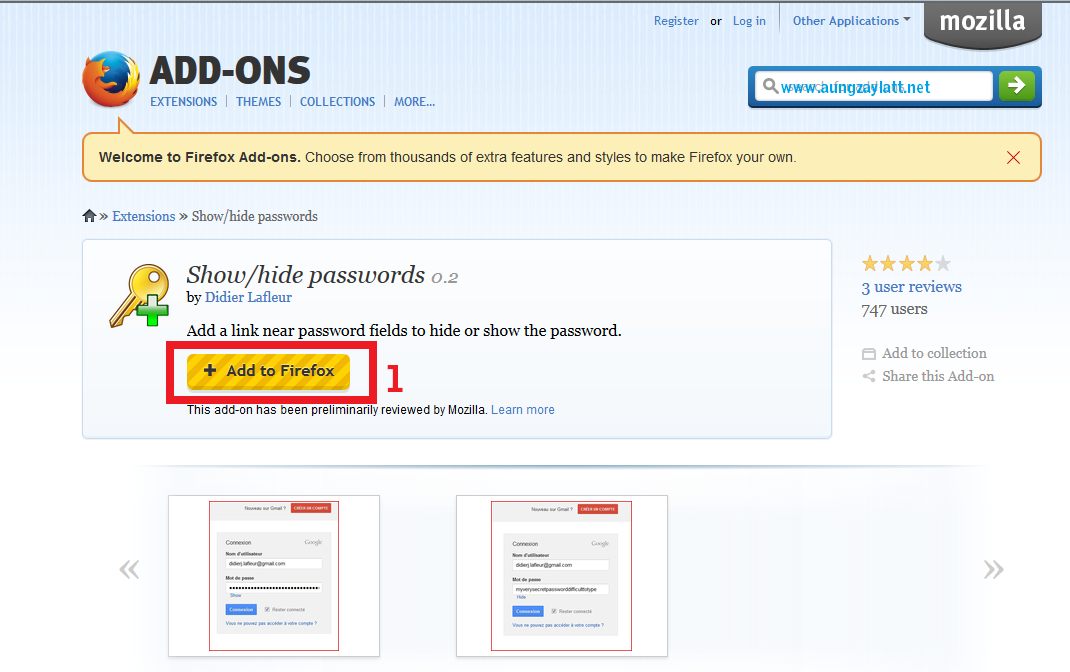
Add on ေလးတခု႔ထည့္ေပးရမယ္ မေၾကာက္ပါနဲ႔ အဲ့ဒီ Add On က Firefox ကေပးတဲ့ Add on ပါ

Add on ကို ဒီေနရာ မွာ ယူလိုက္ပါ


ဆိုဒ္ထဲေရာက္ရင္ Add to Firefox ကိုႏွိပ္လိုက္ပါ


ေဒါင္းၿပီးရင္ install လုပ္ေပးရပါမယ္


install လုပ္ၿပီးရင္ၾကည့္လိုက္ပါ password ရိုက္တဲ့အကြက္ရဲ႕ေဘးမွာ

show ဆိုတာေလးပါ ပါတယ္ ၾကည့္ခ်င္ရင္ show ကိုႏွိပ္လိုက္ပါ

ျပန္ေဖ်ာက္မယ္ဆို hide လို႔ေပၚပါတယ္

အာဆို password လြဲ မွာမေၾကာက္ရေတာ့ဘူးေပါ့ေနာ္ ..ဟီးဟီးဟီး

ဒါေလးပါပဲခင္ဗ်ာ


ကိုလတ္(ကြ်ဲဆင္း)

วันอังคารที่ 4 กุมภาพันธ์ พ.ศ. 2557

Facebook Fan Page ကိုမလိုျခင္ျပန္ဖ်က္နည္း

ဘေလာ့ကာမိတ္ေဆြမ်ားအတြက္  မိမိတို႕ လုပ္မိထားေသာ ဘေလာ့ကာရဲ႕ facebook fan page အပိုေတြကို ဖ်က္လိုပါက  ဖ်က္နိဳင္ရန္  နည္းလမ္းေလးကို တင္ျပလုိက္ရပါတယ္ေနာ္... အလြယ္ေလးပါ
                             
    အျမန္ဖ်က္ခ်င္ရင္ ဒီကို ႏွိပ္လိုက္ - https://www.facebook.com/pages/Delete
 ေအာက္မွာ ပုံေလးနဲ႕တစ္ကြ ရွင္းျပေပးထားပါတယ္.....
 မိမိတို႕ facebook ကေန ဖ်က္လိုေသာ  ေပ့ကိုကလစ္ေပးလိုက္ပါ..အေပၚပုံကျပထားသလိုေပါ့..ေနာ္
 အေပၚပုံတိုင္းက်လာမယ္..အဲခါမွာ Edit Page ကေနကလစ္ျပီး Manage Permissions ဆိုတာကိုကလစ္ပါ.
အေပၚပုံတိုင္းထပ္က်လာတာနဲ႕ ေအာက္နားမွာ Delete For .....မိမိဘေလာ့ေပ့အမည္... ဆိုျပီးရွိပါတယ္
အဲတာကိုကလစ္ျပီး ဖ်က္ေပးလိုက္တာနဲ႕  ok  ေပါ့ေနာ္.... အဆင္ေျပၾကပါေစ....

LinkWithin

Related Posts Plugin for WordPress, Blogger...

Share

Twitter Delicious Facebook Digg Stumbleupon Favorites More