မဂၤလာပါေမာင္ခိုင္ထူးဘေလာ့ကိုလာလည္ေသာမိတ္ေဆြအေပါင္းေပ်ာ္႐ႊင္ခ်မ္းေႁမ႔ၾကပါေစ

This is default featured post 1 title

Go to Blogger edit html and find these sentences.Now replace these sentences with your own descriptions.This theme is Bloggerized by Lasantha Bandara - Premiumbloggertemplates.com.

This is default featured post 2 title

Go to Blogger edit html and find these sentences.Now replace these sentences with your own descriptions.This theme is Bloggerized by Lasantha Bandara - Premiumbloggertemplates.com.

This is default featured post 3 title

Go to Blogger edit html and find these sentences.Now replace these sentences with your own descriptions.This theme is Bloggerized by Lasantha Bandara - Premiumbloggertemplates.com.

This is default featured post 4 title

Go to Blogger edit html and find these sentences.Now replace these sentences with your own descriptions.This theme is Bloggerized by Lasantha Bandara - Premiumbloggertemplates.com.

This is default featured post 5 title

Go to Blogger edit html and find these sentences.Now replace these sentences with your own descriptions.This theme is Bloggerized by Lasantha Bandara - Premiumbloggertemplates.com.

วันอาทิตย์ที่ 11 สิงหาคม พ.ศ. 2556

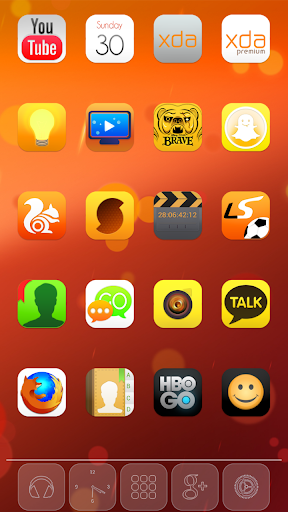
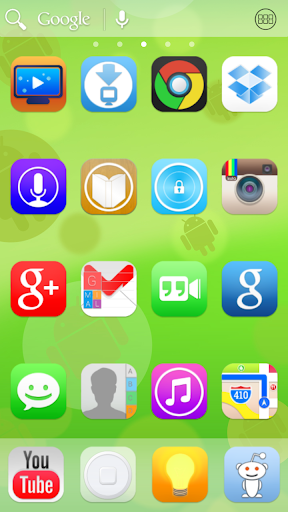
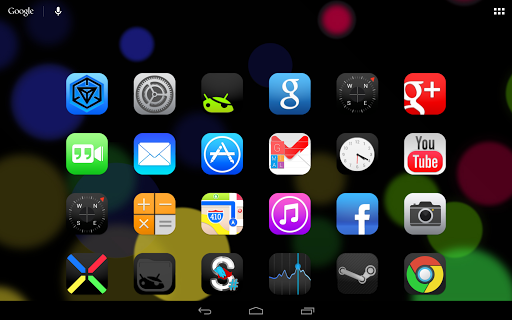
Ultimate iOS7 Apex Nova Theme v1.9 apk For Android

Ultimate iOS7 Apex Nova Theme apk

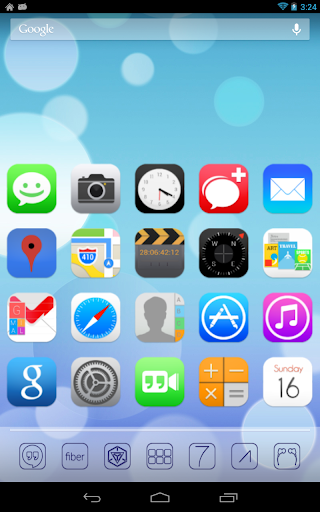
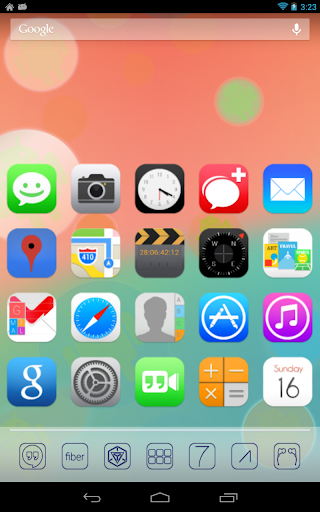
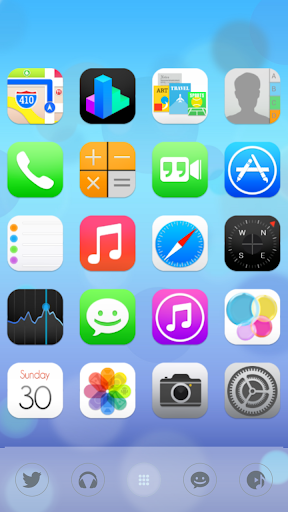
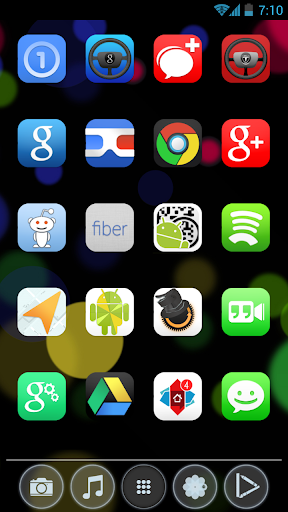
Android ဖုန္းေတြမွာလည္း iOS7 ကိုအသံုးျပဳႏိုင္ေနျပီေနာ္။ အရင္တစ္ေခါက္ကလည္း တင္ေပးဖူးပါတယ္။ အခုေတာ့ Version အသစ္ေလးထြက္လာလို႔တင္ေပးလိုက္ပါတယ္ဗ်ာ။ Theme ေလးကေတာ့ အေတာ္ေလး ကိုေကာင္းမြန္ပါတယ္ဗ်ာ။ ရုပ္ထြက္ကလည္း အဆင့္မွီပါတယ္။ နမူနာအေနနဲ႕ ေအာက္ကပံုေတြကို ၾကည့္ ၾကည့္ပါဦး။ သေဘာက်မယ္လို႔ထင္ပါတယ္ဗ်ာ။ Android OS တစ္ခုလံုးကို iOS7 အေနနဲ႔ Deepfreeze အုပ္ လိုက္သလိုမ်ိဳးေပါ့ဗ်ာ။


**  Step-1.ေအာက္က Download Button ကိုႏွိပ္လိုက္ပါ  
**  Step-2. "5sec". ေလာက္ေစာင္႕ေပးပါ။

**  Step-3. "  << SKIP AD >>   ".ကိုႏွိပ္ေပးပါ။
**  Step-4. Download Link က်လာပါလိမ္႕မယ္။
**  အဆင္ေျပပါေစဗ်ာ။

Airdroid V2.0.4

chrome မွာ Airdroid ကို phone နဲ႕ join ထားတာပါ


အရင္ဆုံး phone မွာ airdroid ကို open လိုက္ရင္ ဒီလိုေလး ေပၚလာမွာပါ ျပီးရင္ ကိုယ္သုံးမယ့္ browser မွာ phone ရဲ့ IP : Port ကို ႐ိုက္လိုက္ accept လုပ္ရင္ရပါျပီ

credit by http://www.trtech-mm.com/
Download link >> Click here to download

วันเสาร์ที่ 10 สิงหาคม พ.ศ. 2556

Android ဖုန္းအမ်ဳိးအစားေပါင္း 10000 ေက်ာ္ကို Root ႏိုင္တယ္ဆိုတဲ့ Perfect Root Official version 1.0.0.1679


Perfect root official version 1.0.0.1679 ဟာ 8.8.2013 ရက္ေန႔က ထြက္ရွိလာတာျဖစ္ၿပီး Samsung, HTC, Sony, Google , HTC, Huawei, Sony, Lenovo တို႔ရဲ႕ Android Smart Phone ေတြနဲ႔ အျခား Brand ေတြအပါအဝင္ Brand ေပါင္း ( ၁၀၀၀၀ ) ေက်ာ္ကို error ကင္းကင္းနဲ႔   ျမန္ျမန္ဆန္ဆန္ Root ႏိုင္တယ္လို႔ေရးထားပါတယ္.. ေနာက္ဆံုးထြက္ Android 4.3 ထိ Root ႏိုင္တယ္လို႔ ဆိုပါတယ္.. ဒီေန႔ပဲ ေတြ႕လာလို႔ ျပန္လည္မွ်ေဝလိုက္တာပါ.. သူ႔ရဲ႕ Official Site မွာေတာ့ Full Version ဝယ္ဖို႔ ေရးမထားပါဘူး. ဒီေကာင္က Full Version ျဖစ္တယ္လို႔ယူဆရမလိုျဖစ္ပါတယ္..
Root လုပ္ႏိုင္တဲ့ စာရင္း အျပည့္အစံုကို http://www.wmshua.com/root.htm မွာ သြားေရာက္ေလ့လာႏိုင္ပါတယ္..


Perfect ROOT is the perfect brush's a versatile tool for Android phones ROOT, ROOT original twin-engine program. And supports Samsung, HTC, Sony, Google , HTC, Huawei, Sony, Lenovo a few big brands more than a thousand models a key root , and remove the ROOT and installed automatically with the drive function.
ROOT perfect self-developed twin-engine technology greatly improves the success rate of Brush, the majority Andrews Friends of the machine tool of choice for ROOT privileges.
Perfect for root characteristics
A key to root
without any preparation
massive models
support eight brands more than a thousand models Xpress root
highest success rate of
the most stable root tool
Update log
A perfect support Andrews 4.3ROOT.
(2) support almost all major brands of mainstream models ROOT.


အဆင္ေျပပါေစ..credit by

ေမာင္ေပါက္< Knowledge Note >
www.maungpauk.org

myanmar font

วันอังคารที่ 16 กรกฎาคม พ.ศ. 2556

Windows Update ေတြျဖစ္ေနတာကို ပိတ္ရေအာင္


ဒါကေတာ့ Windows Update ပိတ္ခ်င္သူမ်ားအတြက္ သြားပိတ္ရမယ့္ေနရာေလးေတြကို ျပေပးလိုက္တာပါ..။ ဘာေၾကာင့္ Windows Update လုပ္တာလဲ..။  အခုဒီနည္းက ကြန္ပ်ဴတာ ေရာင္းတဲ့ဆိုင္ေတြမွာ စက္ဝယ္တဲ့အခါ Original Windows မပါရင္၊ သူတို႔ ဘာသာ Windows တင္ေပးတတ္ပါတယ္..။   အဲလိုအခါမ်ိဳးက်ရင္ Windows Update မတက္ေအာင္ အခုက်ေနာ္ျပတဲ့ နည္းေလးေတြနဲ႔ ပိတ္ေပးလိုက္ၾကပါတယ္..။ ေနာက္တခုက Windows တင္တင္ခ်င္းမွာလဲ Update မတက္ေအာင္ ပိတ္ခဲ့ရတဲ့ ေနရာတခုရွိပါတယ္..။
Automatically Windows Update အင္တာနက္လိုင္းဖြင့္တာနဲ႔ ေအာ္တိုမက္တစ္ Update လုပ္မယ္ဆိုတဲ့ ေနရာမွာ အမွန္ျခစ္ေလး ျဖဳတ္ေပးခဲ့ရမွာ ျဖစ္ပါတယ္..။ သူကေတာ့ ဝင္းဒိုးတင္တဲ့အခ်ိန္မွာ လုပ္ရတာျဖစ္တဲ့အတြက္ ပံုနဲ႔ျပေပးဖို႔ ခက္ပါတယ္..။ ဒါေၾကာင့္ စာပဲေရးျပေပးလိုက္တာပါ..။ အခုလုပ္ရမယ့္ အဆင့္ေတြကေတာ့ ေအာက္ကပံုေလးေတြအတိုင္းပါပဲ..။
ပထမဆုံး  ကြန္ပ်ဴတာ  Start  ကေန  Control Panel  ကိုသြားေပးလိုက္ပါေနာ္..ေအာက္မွာ ပုံေလးေတြ ၾကည့္ျပီးလိုက္လုပ္ေပးလိုက္ၾကပါ...အဆင္ေျပသြားးေစမယ္..ေနာ္...
 
 
 သည္ထဲမွာဘဲ   Window Update  ဆိုတာကိုရွာ ကလစ္လုိက္ပါ
ပုံမွာ ျပထားသလို  Change Setting  ဆိုတာကို ကလစ္ေပးလိုက္ပါ။
 
သည္မွာေတာ့ အေပၚက  Important  Update  မွာေတာ့  never check for updates ဆိုတာေရြးေပးပါ။
ေအာက္နားက  အကြက္ေလးေတြ မွန္သမွ်  အမွန္ျခစ္ အကုန္ျဖဳတ္ေပးးရပါမယ္....
အဲတာဆိုရင္ေတာ့   Window  Update  လုပ္ေဆာင္ခ်က္ေတြ  ေအာ္တို ရပ္ဆိုင္းးသြားပါ့မယ္ဗ်ာ...
ေနာက္တစ္ခုကေတာ့  Control  Panel  Home  ကိုျပန္သြားးလိုက္ပါ.....
 
Action  Center  ဆိုတာကိုကလစ္ေပးလိုက္ပါေနာ္..
Change Action Center Setting  ဆိုတာကိုဆက္ကလစ္လုိက္ပါ... အဲမွာ ပုံမွာျပထားသလို
 
အားလုံးးကို အမွန္ျခစ္ေတြ လိုက္ျဖဳတ္ေပးလိုက္ရမွာ ျဖစ္ပါတယ္... စိတ္ခ်လက္ခ် ျဖဳတ္ခ်လိုက္ပါ... ေနာက္
အိုေက  ေပးလုိက္ပါေတာ့  အားးလုံးး  ဖလန္းးဖလန္းးး  အိုေက ဆိုေျပတဲ့  ကြန္ပ်ဴတာေလးျဖစ္ပါျပီ...
ေိေိ...အေနာ္ေျပာတာေနာ္... မယုံနဲ႕...ဗ်ဲ..စတာပါ... မသိေသးေသာ  ၀ါသနာရွင္မ်ားအတြက္ ရွာေဖြျပီး
မွ်ေ၀လိုက္ျခင္းျဖစ္ပါတယ္... ေက်းဇူးတင္ပါတယ္...

วันศุกร์ที่ 12 กรกฎาคม พ.ศ. 2556

FACEBOOK ကို ျမန္မာဘာသာျဖင့္ အသုံးျပဳနုိင္ၿပီ

Facebook ကို ယခင္က ျမန္မာမ်ားအတြက္ အဂၤလိပ္ဘာသာကို အဓိကထား အသံုးျပဳၾကၿပီး အျခား ဘာသာျဖင့္ အနည္းငယ္ အသံုးျပဳေနၾကသည္ကို ေတြ႕ရပါသည္။ ယခုတြင္မူ ျမန္မာတုိ႔ အတြက္ ျမန္မာဘာသာျဖင့္ အသံုးျပဳႏိုင္ရန္ ျမန္မာတခ်ိဳ႕ ကိုယ္တုိင္ ပါဝင္ ဘာသာျပန္ေနေသာ Facebook translation team မွ ျမန္မာဘာသာကို ၁ဝဝ ရာခိုင္ႏႈန္း ေျပာင္းလဲမႈေပးၿပီး ျဖစ္ပါသည္။ ၉၈ ရာခုိင္ႏႈန္းခန္႕ျပီးစီးေနျပီလုိ႕သိရပါတယ္။ ျမန္မာဘာသာသုိ႕ေျပာင္းလဲနည္းကေတာ့ ေအာက္ပါအတုိင္းပါ။ Facebook ရဲ႕ search box မွာ Translation လုိ႕ရုိက္ထည့္ပါ။ ေအာက္ပါအတုိင္းပါ။

 Welcome To Translation ဆုိတဲ့စာမ်က္ႏွာထပ္ေပၚလာပါမယ္။ Selection box ထဲက " ျမန္မာဘာသာ" ဆုိတာကုိေရြးေပးျပီး Continue ခလုတ္ကုိႏွိပ္ပါ။


 အခုေပၚလာမယ့္စာမ်က္ႏွာမွာေတာ့ ျမန္မာလုိမေပၚေသးဘဲ ထိပ္ဆုံးမွာအနီေရာင္ေဘာင္ခတ္ထားတဲ့ Warning Box ေလးနဲ႕ We recommendly use .... facebook to ျမန္မာဘာသာ ဆုိတာေလးေပၚလာပါမယ္။ အဲဒီလင့္ေလးကုိႏွိပ္ပါ။ ေအာက္ပုံအတုိင္းပါ။
 အခုဆုိရင္ေတာ့ Facebook ဟာျမန္မာဘာသာသုိ႕ေျပာင္းလဲသြားျပီျဖစ္ပါတယ္။

 ျမန္မာလုိကေန English လုိျပန္ေျပာင္းခ်င္တယ္ဆိုရင္ေတာ့ ေအာက္ပါ link ကုိ၀င္ပါ.
https://www.facebook.com/settings?tab=account&edited=language 
ျပီးရင္ ေပၚလာတဲ့ General Setting စာမ်က္ႏွာေအာက္ဆုံးက Language ထဲသုိ႕၀င္ျပီး English (UK) သုိ႕ျပန္ေျပာင္းျပီး Save Changes ကုိႏွိပ္ပါ။ Facebook သည္ English ဘာသာစကားျဖင့္ျပန္ျဖစ္သြားပါလိမ့္မယ္။
အားလုံးပဲအဆင္ေျပၾကလိမ့္မယ္လုိ႕ထင္ပါတယ္။

 Credit .http://thaiinmyanmarit.blogspot.com / myanmarupdatechannel

วันพฤหัสบดีที่ 11 กรกฎาคม พ.ศ. 2556

How to set up Zawgyi in browser setting and gtalk

ဆရာညီေနမင္းကေနမလာတာပါ...

ခုကေတာ့ gtalk ကေန Zawygi keyboard ကုိ ထည့္ထားေပ မယ့္ ျမန္မာလုိ အဆင္ေျပေျပ မျမင္ရဘူး စာရုိက္ လွ်င္ ေလးေထာင့္ တုံးေတြပဲ ျမင္ရလုိ႔ဆုိၿပီး အကူအညီေတာင္း လားလုိ႔ ကၽြန္ေတာ္ တင္ေပးလုိက္ပါတယ္။ လုပ္ရမွာက ၃ ေနရာမွာပဲ setting ပုိင္း ၀င္ျပင္ေပးရမွာပါ။ ကဲ ၾကည့္ၾကည့္လုိက္ပါ. အဆင္ေျပၾက လိမ့္မယ္ လုိ႔ ေမွ်ာ္လင့္မိပါတယ္။ ခုသင္ေပးတဲ့အတုိင္း ၃ ေနရာမွာသာ ၀င္ျပင္ေပး လုိက္ပါ။ အဲ့ဒါဆုိရင္ အားလုံးမွာ ျမန္မာလုိ ျမင္ရပါၿပီ။ 

LinkWithin

Related Posts Plugin for WordPress, Blogger...

Share

Twitter Delicious Facebook Digg Stumbleupon Favorites More